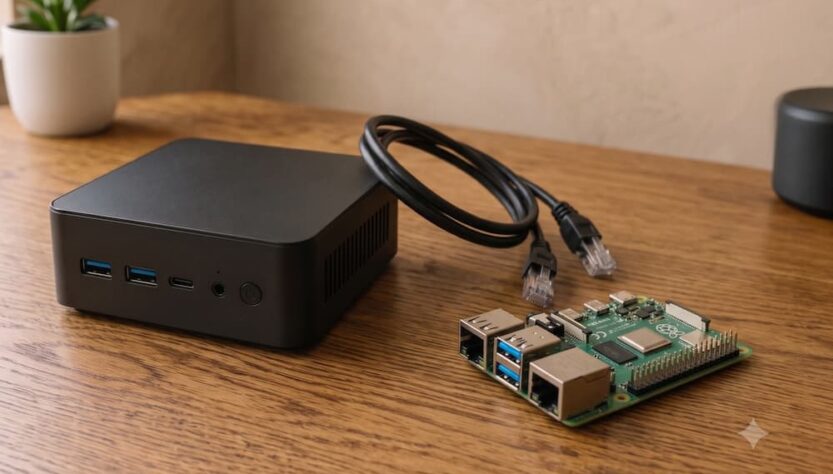
For most home servers, a mini PC is the better choice because it offers faster processors, broader software compatibility, upgradeable storage and more memory. A Raspberry Pi remains the stronger option for electronics, GPIO-based automation, battery-powered devices and highly energy-efficient distributed projects.
The decision becomes less obvious when both platforms have similar purchase prices. A Raspberry Pi board looks inexpensive at first, but a complete server also needs a reliable power supply, cooling, a case and storage. A refurbished business mini PC may include all of those components while delivering substantially more computing power.
Your intended workload matters more than the logo on the device. A server running Pi-hole, a password manager and a lightweight wiki has very different requirements from a machine hosting Immich, Nextcloud, Jellyfin, multiple virtual machines and a Kubernetes laboratory. Read the comparison below to match the hardware to the services you actually plan to run.
Key takeaways:
- A mini PC is usually the better all-purpose home server because it provides stronger performance, x86 compatibility and upgradeable components.
- A Raspberry Pi is the better platform for GPIO, sensors, robotics, portable systems and projects where every watt matters.
- An SSD-equipped mini PC is more suitable than a microSD-based Raspberry Pi for databases, media libraries and write-intensive applications.
- The complete platform cost should include storage, cooling, power supplies, adapters and future expansion rather than only the price of the main board.
Raspberry Pi vs Mini PC: Which Is Better for a Home Server?
A mini PC is better for most multi-service home servers, while a Raspberry Pi is better for lightweight services and hardware-oriented DIY projects. The distinction comes from the original purpose of each platform. A mini PC is a conventional personal computer compressed into a small enclosure. A Raspberry Pi is a single-board computer designed for education, embedded computing and experimentation.
A modern Intel N95 or N100 mini PC, as well as a refurbished Lenovo ThinkCentre Tiny, HP ProDesk Mini or Dell OptiPlex Micro, can function as a complete server immediately after installation. It usually includes an internal SSD interface, replaceable memory, a power adapter, an enclosure and active or passive cooling.
A Raspberry Pi provides a different kind of flexibility. Its GPIO header, camera connectors, display interfaces and large ecosystem of HAT expansion boards make it possible to connect:
- Temperature, humidity, motion and air-quality sensors
- Zigbee, Z-Wave and other home automation radios
- Relays, motors, LEDs, buttons and small displays
- Camera modules and computer vision accessories
- Battery packs, robotics components and custom control boards
If none of those interfaces are required, the practical advantages of the Pi become smaller. A USB GPIO board or a separate microcontroller can also provide hardware control while a mini PC runs the main applications.
| Category | Raspberry Pi | Mini PC |
|---|---|---|
| Best role | DIY controller, lightweight server, embedded device | General home server, virtualization host, desktop replacement |
| Processor architecture | ARM64 | Usually x86-64 |
| Memory | Fixed at purchase and not replaceable | Frequently replaceable and expandable |
| Storage | microSD by default, with USB or HAT-based SSD options | Internal SATA, M.2 SATA or NVMe SSD |
| Expansion | GPIO, cameras, displays, sensors and HAT boards | RAM, SSD, network adapters and sometimes PCIe devices |
| Power consumption | Usually lower, especially under light workloads | Higher, but efficient models can idle below 10 watts |
How Much Performance Do Home Server Applications Need?
Basic network services need little processing power, but media processing, photo analysis, databases and virtual machines benefit greatly from a mini PC. A Raspberry Pi can run an impressive number of containers when workloads remain light, yet the difference becomes visible during concurrent operations.
Services that normally run comfortably on a Raspberry Pi include:
- Pi-hole or AdGuard Home
- WireGuard
- Cloudflared
- Home Assistant
- Navidrome
- Kavita with a modest library
- A lightweight password manager
- A small wiki or note-taking application
- Syncthing with limited simultaneous transfers
More demanding applications include:
- Immich with machine learning and thumbnail generation
- Nextcloud with many files, previews and database operations
- Jellyfin or Plex with video transcoding
- Several WordPress installations with databases
- GitLab, monitoring stacks and development platforms
- Proxmox with multiple virtual machines
- Kubernetes clusters running real application workloads
- Financial management software with frequent backups and reports
Historical benchmark comparisons between Raspberry Pi systems and older Intel mini PCs show why this distinction matters. In one set of tests, Intel Core i5 mini PCs completed H.264 FFmpeg encoding roughly four times faster than a Raspberry Pi 4. The same systems scored approximately 2.7 to 2.8 times higher in PHPBench, which is relevant to PHP-based applications such as Nextcloud and WordPress.
The largest difference appeared during Linux kernel compilation. The Raspberry Pi required more than 4,600 seconds, while the tested mini PCs completed the task in approximately 345 to 374 seconds. A Raspberry Pi 5 is substantially faster than a Pi 4, but current low-power x86 systems still provide more headroom for sustained compilation, image processing and virtualization.
From my testing, storage latency often becomes noticeable before raw CPU usage does. An application may appear responsive during a simple demonstration, then slow down when several containers write logs, databases update, Syncthing indexes files and Nextcloud generates previews at the same time.
Does x86 Compatibility Make a Mini PC More Flexible?
Yes, an x86 mini PC usually offers broader operating system, container image, driver and application compatibility than an ARM-based Raspberry Pi. Most commercial desktop software and a large proportion of server software are developed and tested first for x86-64 systems.
A mini PC can commonly run:
- Windows 10 or Windows 11
- Mainstream Linux distributions
- Proxmox Virtual Environment
- VMware-compatible workloads
- TrueNAS SCALE on suitable hardware
- OpenMediaVault
- Docker and Podman containers
- Linux and Windows virtual machines
Raspberry Pi systems normally run Raspberry Pi OS, Debian, Ubuntu or another ARM-compatible Linux distribution. Many popular self-hosted projects publish ARM64 container images, so the architecture is not automatically a problem. Difficulties appear when a project distributes only x86 binaries, depends on an unsupported library or provides an ARM build that receives less testing.
Architecture also affects virtualization. An x86 mini PC can host standard x86 Windows and Linux virtual machines without translating processor instructions. A Raspberry Pi can run ARM virtual machines and containers efficiently, but conventional x86 guest systems require emulation, which adds complexity and reduces performance.
For DevOps training, the choice depends on the learning objective. A mini PC is better for studying local services, Linux administration, Docker, Proxmox, monitoring, backups and infrastructure automation. A cloud account or inexpensive VPS is often better for learning:
- Public networking and cloud firewalls
- Managed load balancers
- Cloud identity and access management
- Infrastructure as Code against provider APIs
- Managed databases and object storage
- Disposable multi-node environments
One physical computer can teach Kubernetes installation and basic operations, but it cannot fully reproduce node failure, distributed storage and real network separation. Several Raspberry Pis or several mini PCs can form a useful cluster, although virtual machines on one sufficiently powerful mini PC are cheaper and easier to reset.
Which Storage Platform Is Safer for 24/7 Operation?
An internal SSD in a mini PC is generally safer and faster for continuous server workloads than a microSD card in a Raspberry Pi. This matters for services that constantly update databases, logs, search indexes, metadata and thumbnails.
microSD cards are convenient for testing and lightweight appliances, but they have several limitations:
- Lower random read and write performance
- Limited write endurance on inexpensive cards
- Greater risk of filesystem corruption after power loss
- Lower practical capacity than common SSDs
- Performance that varies significantly between card models
A Raspberry Pi can boot from an SSD, which removes much of this disadvantage. Depending on the model and enclosure, storage can be connected through:
- A USB-to-SATA adapter
- A USB NVMe enclosure
- An M.2 HAT
- A case with an integrated SSD interface
The improvement is worthwhile, but it increases the complete cost and physical complexity of the system. Poorly supported NVMe adapters, insufficient power supplies and overheating controllers can also cause freezes that users incorrectly attribute to the Pi itself.
Mini PCs usually provide a cleaner storage path. Even older business systems may include a 2.5-inch SATA bay, while newer models frequently support M.2 NVMe drives. Some systems accept both, allowing the operating system to run from NVMe storage while a larger SATA SSD stores media or backups.
Users who need several hard drives, RAID-style redundancy or multiple network cards should also consider a small form factor computer rather than a tiny mini PC. Refurbished systems such as a Dell OptiPlex SFF, HP ProDesk SFF or Lenovo ThinkCentre SFF may provide:
- Several memory slots
- Multiple SATA connectors
- Full-size or low-profile PCIe slots
- Space for more than one storage drive
- Improved cooling under sustained workloads
How Do Power Consumption and Total Cost Compare?
A Raspberry Pi normally consumes less electricity, but an efficient mini PC may add only a few watts at idle while delivering several times more performance. The real financial difference depends on local energy prices, average CPU load and whether the server runs continuously.
Representative measurements from different systems illustrate the range:
- A Raspberry Pi may idle at approximately 2 to 5 watts, depending on the model, storage and connected accessories.
- An efficient modern mini PC may idle at approximately 6 to 10 watts.
- An older mini PC may idle closer to 10 to 15 watts.
- A mini PC under sustained CPU load may consume approximately 25 to 40 watts.
Annual energy use can be estimated with this formula:
Power in kilowatts × electricity price per kWh × 24 hours × 365 days
A device averaging 5 watts uses approximately 43.8 kWh per year. A device averaging 10 watts uses approximately 87.6 kWh. This difference matters in regions with expensive electricity, but it should be weighed against the amount of useful work completed per watt.
A faster mini PC may finish photo indexing, media conversion or compilation quickly and return to a low-power idle state. A slower board may remain heavily loaded for much longer. Idle consumption is therefore useful for always-on services, while performance per watt matters for burst workloads.
The purchase price must also be calculated as a complete system. A Raspberry Pi setup may require:
- The main board
- An official or high-quality power supply
- A case
- An active cooler or large heatsink
- A microSD card or SSD
- An SSD adapter, HAT or enclosure
- Additional cables
A used mini PC often includes the enclosure, power adapter, cooling system and internal storage interface. Depending on the listing, it may also include RAM and an SSD. That can make a refurbished system cheaper than a fully equipped Raspberry Pi even when the board itself has a lower advertised price.
Used business systems deserve particular attention. Lenovo ThinkCentre Tiny models such as the M720q can support large memory configurations and, with the correct riser, selected PCIe expansion cards. HP ProDesk Mini and Dell OptiPlex Micro systems are also widely available, easy to service and designed for long operating hours.
When Does a Raspberry Pi Make More Sense Than a Mini PC?
A Raspberry Pi makes more sense when a project needs GPIO, very low power consumption, minimal size, silent operation or native ARM development. These are not minor advantages when the computer becomes part of a physical device rather than a conventional server.
Strong Raspberry Pi use cases include:
- A robot, drone or mobile sensor platform
- A custom security camera
- A wall-mounted Home Assistant panel
- A weather station or environmental monitor
- A battery-powered data logger
- A network appliance running Pi-hole or WireGuard
- An ARM64 software development and testing system
- A compact cluster for experimenting with distributed services
A cluster of small boards also offers an educational advantage. Services can be distributed across separate physical nodes, making it possible to practice failover, load balancing, sharding, network segmentation and Infrastructure as Code. If one node fails, the remaining nodes may continue running part of the environment.
This approach trades simplicity for resilience and experimentation. Six low-power boards create more cables, power supplies, storage devices and operating systems to maintain. A single mini PC running virtual machines is easier to administer, while a physical cluster teaches concepts that virtualization can hide.
The Raspberry Pi ecosystem is another genuine strength. Because many identical units are deployed worldwide, installation guides, compatible accessories and troubleshooting information are easy to find. Refurbished mini PCs vary by model, processor, firmware, network controller and internal layout, so upgrades sometimes require more research.
Which Platform Fits Jellyfin, Nextcloud, Immich and Home Assistant?
A mini PC is the safer choice for running all of these services together, while a Raspberry Pi works best when the workload is divided or limited to lighter applications. Jellyfin and Immich are the decisive services because both can create sudden CPU, GPU and storage demand.
| Application | Raspberry Pi Suitability | Mini PC Advantage |
|---|---|---|
| Jellyfin | Good for direct play and limited users | Intel Quick Sync can accelerate transcoding |
| Nextcloud | Suitable for a small installation with SSD storage | Faster previews, database queries and file indexing |
| Immich | Possible, but indexing and machine learning may be slow | More CPU, memory and storage performance for large libraries |
| Home Assistant | Excellent for a dedicated installation | Can run alongside many unrelated services and virtual machines |
| Pi-hole | More than sufficient | No meaningful advantage unless consolidated with other services |
| Syncthing | Good for moderate file collections | Faster scanning, hashing and simultaneous transfers |
For Jellyfin or Plex, direct play changes the calculation. If the client supports the original video codec, resolution, bitrate and audio format, the server mostly reads the file and sends it over the network. A Raspberry Pi can handle this efficiently.
Transcoding is different. The server must decode and re-encode the stream, often while generating subtitles or changing audio formats. An Intel mini PC with Quick Sync Video can complete this work using dedicated media hardware rather than relying only on CPU cores. Processor generation still matters because newer integrated graphics support newer codecs and more capable encoding engines.
Immich creates another demanding workload during the initial import. It generates thumbnails, reads metadata, performs machine learning tasks and writes to a database. The service may run on a Raspberry Pi, but a mini PC provides a smoother experience when importing a large photo collection.
In my experience as a developer, 16 GB of replaceable RAM is a sensible starting point for a server expected to run several databases, containers and development tools. Eight gigabytes can be enough for a carefully managed setup, but it leaves less room for caching, temporary processing and future experimentation.
Find out: Can You Power a Mini PC with a Power Bank?
What Should You Buy for a Home Lab or DIY Project?
Buy a mini PC when the device will primarily behave like a server or computer, and buy a Raspberry Pi when it will primarily behave like an embedded controller. This rule resolves most versions of the mini pc vs raspberry pi debate.
Choose a mini PC when your priorities include:
- Running many self-hosted applications on one machine
- Using Proxmox, virtual machines or Windows
- Hosting Nextcloud, Immich or multiple web applications
- Transcoding Jellyfin or Plex streams
- Upgrading RAM and storage later
- Using NVMe storage without external adapters
- Adding faster network interfaces
- Learning conventional server administration
Choose a Raspberry Pi when your priorities include:
- Controlling sensors, relays, motors or displays
- Building robotics and portable projects
- Keeping power consumption as low as possible
- Developing and testing ARM software
- Running one or two lightweight network services
- Building a physical cluster for distributed systems experiments
- Using camera modules or HAT expansion boards
Consider a small form factor desktop when storage expansion is more important than minimum size. It consumes more space than a mini PC, but additional SATA ports, PCIe slots and larger cooling systems make it a better foundation for a NAS, backup server or media archive.
A cloud platform or VPS is more suitable when the goal is to learn provider-specific DevOps tools rather than maintain local hardware. A practical setup can combine all three approaches:
- A mini PC for persistent local services and virtual machines
- A Raspberry Pi or microcontroller for sensors and hardware control
- Temporary cloud resources for public networking and cloud automation exercises
Read also: Mini PC vs Laptop: Which One Should You Choose for Your Desk?

